
The constraint a smart lock can't avoid
A door lock has one job that a meter or an automation controller doesn't: it has to open at the exact moment someone is standing in front of it, whether or not the Wi-Fi is up, the router rebooted overnight, or the property is in a spot with weak signal. Building an unlock mechanism that depends on reaching a server at that exact moment turns any network hiccup into someone locked out of their own home. At the same time, the person granting access - a host, a landlord, a property manager - is very often not standing at that door at all, and may be issuing that access from a different city or a different country. Aliste's wireless, time-based OTP feature is built around solving both problems with the same piece of math.
What "time-based OTP" actually means
A time-based one-time password isn't a code that's looked up from a database or pushed over a network. It's calculated - independently, on each side - from exactly two inputs: a secret that's unique to that lock, and the current time. The secret only has to move once, during setup, when the app and the lock exchange it over a short-range local connection. After that single exchange, neither side ever needs to send the other anything to produce or check a code again.
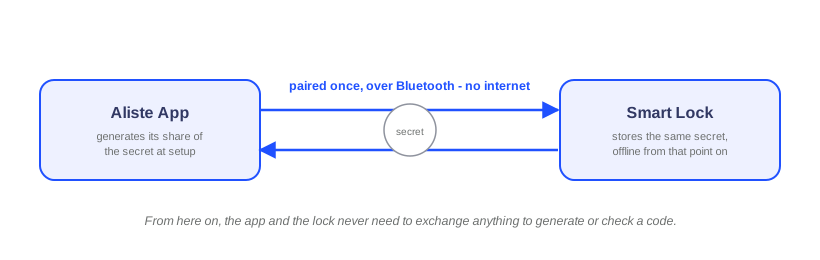
How the same code shows up on both ends without them talking
Once both sides hold the secret, generating a code is a self-contained calculation: feed the secret and the current time into a one-way function, and out comes a code. Because the app and the lock are running the same calculation on the same secret at (roughly) the same time, they arrive at the same code independently - not by asking each other, but by computing the same thing separately and getting the same answer. The only place the two sides actually meet is physical: someone reads the code off the app and types it into the lock's keypad.
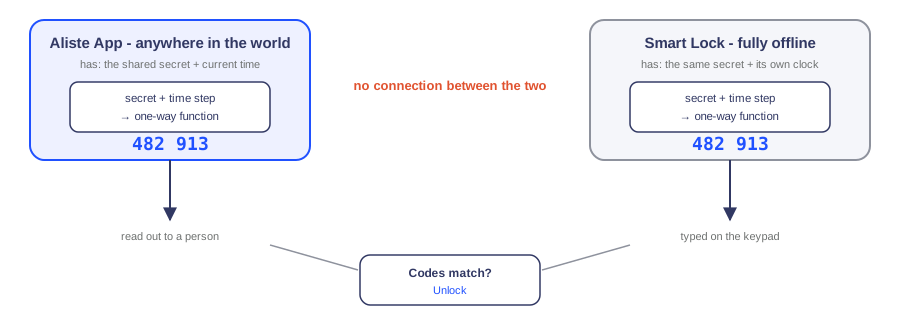
Why the lock never checks in with anyone before accepting a code
A different design could have a server generate a code and push it to the lock to store, or have the lock call out to a server to ask "is this code valid?" before it opens. Either approach makes an internet connection a precondition for getting through the door, exactly the failure mode a lock can't afford. A time-based OTP sidesteps this because the lock isn't checking anything with anyone - it computes its own expected code from the secret and its own clock, and compares that against what was typed in. The verification happens entirely inside the lock, with nothing to fetch and nowhere to call.
Generating a code from anywhere in the world is a side effect of the math, not a separate feature
Because producing a valid code only needs the secret and the current time - both of which the app already has - it works exactly the same whether the phone generating it is standing next to the door or on the other side of the planet. Nothing has to reach the lock, and the lock doesn't have to be reachable, for a correct code to exist. That's what makes it practical for a host travelling abroad, a property manager coordinating a move-in from another city, or anyone granting access to a door they aren't near, without needing a live connection to that specific lock at the moment they generate it.
Clocks drift a little - here's what absorbs that
Two independent clocks - one in a phone, one in a lock - won't stay perfectly in sync forever. To account for that, a code is accepted for a short window around its exact time slot, not just a single instant, so a few seconds of drift doesn't cause a valid code to fail. That tolerance is deliberately narrow: wide enough to absorb normal clock drift, not wide enough to let an old code linger. Once a window has fully passed, its code is gone - it can't be replayed later, even by someone who saw it.
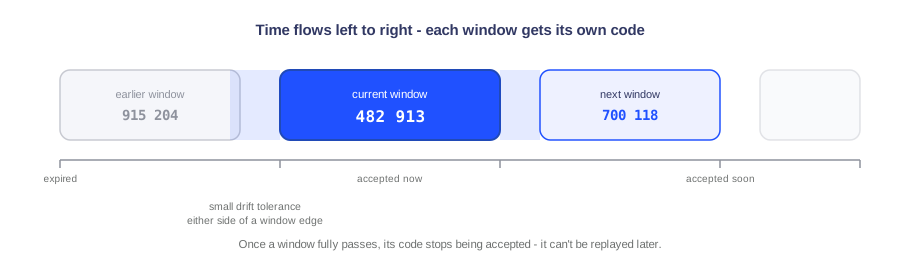
Why this is what a smart lock specifically needs
Put together, the two properties this design gives - the lock never has to be online to check a code, and a code can be generated by someone who isn't anywhere near the lock - both come from the same fact: the code is computed, not communicated. That's a different set of priorities than Aliste's connected metering and automation devices, covered in our post on securing MQTT device communication, which stay online because their job is to continuously report data and receive commands in real time. A lock's job is narrower and less forgiving: it has to work at the one moment that matters, at the door, regardless of what the network is doing, while still letting someone who's nowhere near that door grant time-limited access into it. Time-based OTP is what makes both true without any contradiction between them.
Frequently asked questions
Does the lock need Wi-Fi, Bluetooth or a SIM for the OTP feature to work?
No. Verifying a time-based OTP only requires the secret exchanged once during setup and the lock's own internal clock - no network call happens at the moment someone types a code in at the door.
How can I generate a code for my lock while I'm travelling?
Because generating the code is pure computation - the shared secret combined with the current time - it can be done anywhere the app has that secret, with no connection to the lock itself. The code is generated once and shared however you choose, such as a message or a call, and the lock verifies it independently when it's typed in.
What stops someone from reusing a code after it's been used or seen?
Each code is only valid for its own short time window. Once that window passes, the same secret and function produce a different code, and the lock stops accepting the old one - so a code seen or overheard after the fact doesn't grant any lasting access.
What happens if the lock's clock and the phone's clock drift apart slightly?
A small tolerance around each time window absorbs minor drift, so a code entered just before or after a window's edge still works. Drift beyond that tolerance is what periodic clock synchronization during normal use is there to prevent.
Curious about OTP and Aliste's other smart lock access options?
Keypad, fingerprint, wireless time-based OTP, app and face-unlock - talk to our team about smart locks for your property.
Talk to our team