The app is really two things bundled together
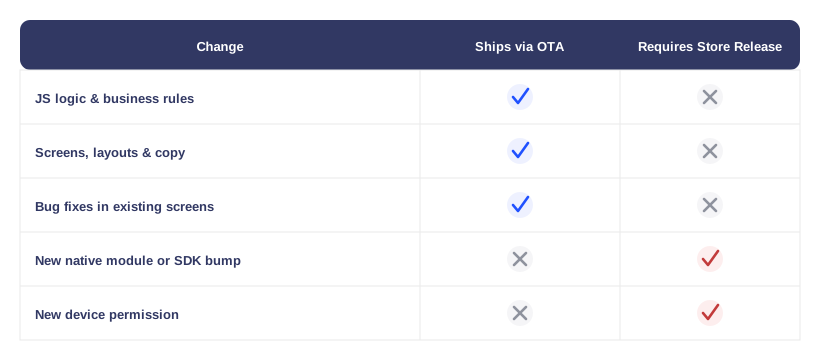
A React Native app looks like a single install from the App Store or Play Store, but it's built from two layers that update on very different schedules. The native shell is the compiled binary - the part Apple and Google actually scan, sign and approve, and the only part a user ever downloads through their app store. Running inside that shell is a JavaScript bundle, which holds most of what a user actually experiences: screens, navigation, business logic, copy, and a good share of the bug fixes engineering ships in an ordinary week. Because the shell and the bundle are separate artifacts, Aliste can replace the bundle a device is running without ever touching the shell those stores already approved - which is the entire premise an over-the-air (OTA) update rests on.
What actually moves, and how it reaches a phone
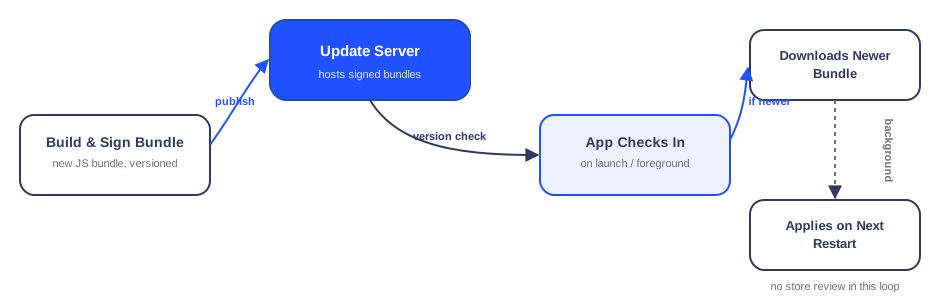
An OTA release starts the same way any change does: engineering builds a new JavaScript bundle from the current codebase. What happens next is the part that's different. Instead of packaging that bundle into a new native binary and submitting it for store review, Aliste signs it and publishes it as a versioned artifact to an update server. Every running app checks in against that server - typically on launch or when it comes to the foreground - and compares the bundle version it's holding against the latest one available for its native shell version. If a newer one exists, the app downloads it quietly in the background and applies it on the next restart, so nobody is looking at half-old, half-new screens mid-session.
Why an update doesn't go to every device at once
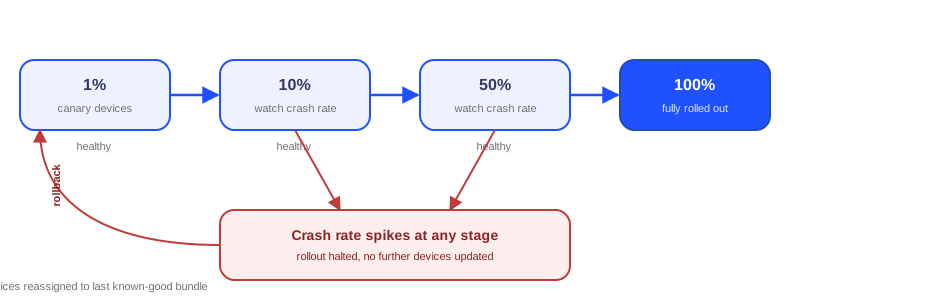
Shipping a new bundle to every device the moment it's ready would turn any bug in that bundle into an incident affecting the entire user base simultaneously. Aliste rolls a new bundle out in stages instead - a small canary slice of devices first, then a wider percentage, then the rest - watching crash rates and error metrics at each stage before letting the rollout continue. If a stage looks unhealthy, the rollout halts before reaching more devices, and the fix is usually simpler than it would be for a native release: point affected devices back at the last known-good bundle version, which is just another versioned artifact already sitting on the same update server. No new store submission is needed to undo a bad OTA push, in the same way none was needed to ship it.
What still needs a full app store release
A bundle can only change what the native shell already exposes to it. Adding a new native module, bumping a native SDK, or requesting a permission the shell hasn't already declared - camera access for a new scan-to-pair flow, Bluetooth for a new lock model - changes the shell itself, and a JavaScript bundle has no way to reach past that boundary. Those changes go through the same app store submission, review and rollout as any other release.
Making sure a device only ever runs a bundle Aliste actually shipped
An OTA bundle travels over the open internet before it lands on a device, so a device that applied it just because it downloaded from the right-looking URL would be trusting a network path it has no real reason to trust. Aliste signs every published bundle with a private key at publish time, and each app verifies that signature before applying anything it downloads - the same principle behind checking payload integrity on Aliste's MQTT device channel, applied here to code instead of a sensor reading. A bundle that doesn't verify is discarded rather than run, regardless of where it appeared to come from.
Why this split is the right trade-off for an app like this
Owner, tenant and partner apps built on top of metering and access-control hardware change constantly on the business-logic side: a billing calculation gets refined, a screen gets reworked, a bug in an edge case surfaces and needs a same-day fix. None of that needs an app store update prompt to reach a user. What does need one is anything that changes what the app can actually do at the device level: a new permission, a new native integration, a new SDK. Keeping OTA scoped to the JS layer and native changes scoped to the store is what lets Aliste ship the first category in hours instead of days, without ever touching the review process the second category exists for.
Frequently asked questions
Does a user have to update from the Play Store or App Store to get an OTA update?
No - if the change lives in the JavaScript bundle, it downloads and applies automatically the next time the app is opened or restarted. There's no update prompt and no store visit involved.
What happens if a bad OTA update ships anyway?
A staged rollout usually catches it at a small percentage of devices, since crash and error rates are checked before the rollout is allowed to continue. If something still needs to be undone, affected devices are pointed back at the previous bundle version - which needs no new store submission, the same way shipping the update in the first place didn't.
Can an OTA update add a new permission or a new native module?
No. A JavaScript bundle can only use what the native shell already exposes to it - it can't add a permission, add a native module, or bump a native SDK. Those changes ship through a full app store release and review, the same as they would for an app with no OTA mechanism at all.
Does a device need to be online to receive an OTA update?
Yes, briefly - it needs a connection to check the update server and download a newer bundle if one exists. Once downloaded, the bundle is stored on the device and applied on the next restart, so being offline at that moment just delays picking it up rather than blocking the app from running normally in the meantime.
Curious how Aliste keeps its apps updated safely?
Ask us how staged rollouts, signed bundles and app store review fit together across our owner, tenant and partner apps.
Talk to our team